
What is the function of the “autocomplete” tag?
The “autocomplete” tag is a feature that allows users to save contact information such as names, addresses, phone numbers, and email addresses for later use in other forms.
Explore our about section and discover advanced solutions for your organisation.
Corporate
TWA Culture
Discover how we are redefining the digital accessibility standard.
Explore our services vertical and discover advanced solutions for your organisation.
Audit Consulting
Accessibility Certification
Get the TWA digital accessibility seal certifying WCAG 2.2 AA compliance and European regulations.
Explore our solutions vertical and discover advanced solutions for your organisation.
Platforms
We All Compliance
The all-in-one platform to manage the complete digital accessibility lifecycle.
Explore our sectors vertical and discover advanced solutions for your organisation.
Public Sector
Accessibility by Sector
Every industry faces specific accessibility requirements. Discover which regulations apply to your organisation.
Explore our regulations vertical and discover advanced solutions for your organisation.
Regulatory Map
Check all current accessibility regulations and the compliance deadlines that apply to your organisation.
Explore our resources vertical and discover advanced solutions for your organisation.
The "autocomplete" tag is vital to improving the accessibility of web forms, especially for users with disabilities or physical limitations.
The “autocomplete” tag is a feature that allows users to save contact information such as names, addresses, phone numbers, and email addresses for later use in other forms.
When a user returns to fill out a form other than the one already completed, the browser can offer suggestions based on previously stored information. This saves time and makes refilling easier. However, when the “autocomplete” feature is not properly configured, it can present accessibility barriers for some users.
For example, people with visual or motor disabilities may find it difficult to complete forms without this feature. That’s why it’s important for website developers to add the “autocomplete” tag to the appropriate form fields, indicating what type of information is expected in each field.
In summary, the “autocomplete” tag is important for improving the accessibility and usability of web forms for a wide variety of users, especially those with disabilities or physical limitations.
See the Pen
Autocomplete by Taller Agencia (@webmastertalleragencia)
on CodePen.
The value that should be assigned to the “autocomplete” tag on a form depends on the type of information being requested in the field. The most common are:
For a complete list of “autocomplete” values and the types of information they represent, you can see the HTML specification for the “autocomplete” tag on the World Wide Web Consortium (W3C) website or at HTML attribute: autocomplete, where numerous examples of how these values could be inserted appear.
It is important to ensure that you use the correct “autocomplete” values in your form to ensure that users can complete the form efficiently and without problems.
To insert the “autocomplete” tag into WordPress forms, its implementation will depend on the form plugin being used. Specifically for the Contact Form plugin, which is the one we use from Your Accessible Website, it is done by following these steps:
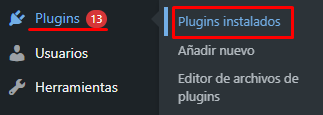
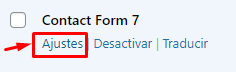
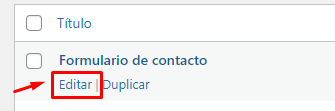
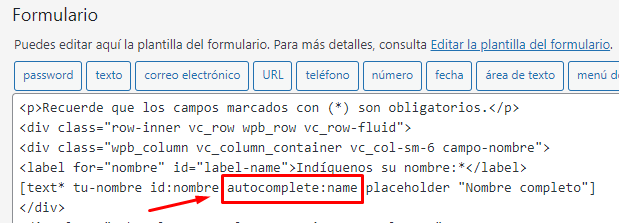
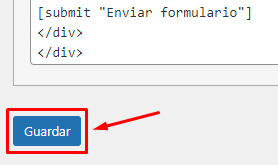
It is essential to have the “autocomplete” tag in the fields of your form to improve the accessibility and usability of your website. In this way, all those users who use assistive technologies such as screen readers or people with cognitive disabilities will be able to fill out the different fields of the form without problems.
It should be noted that browsers such as Google Chrome have their own implementation that remembers the user’s contact information for use on subsequent occasions. Despite this, it is imperative to add the “autocomplete” tag to your forms, since there could be users who have other browsers that do not have this implementation.
It’s also important to remember that while the “autocomplete” tag can improve the accessibility of your forms, it’s not the only feature that needs to be taken into account to make them accessible. It is important to follow all guidelines established by WCAG to ensure that your forms are accessible.
If you have questions regarding web accessibility, contact us and we will answer all your questions in this regard.





Taller de Ideas para la Red S.L. ha recibido una ayuda de la Unión Europea con cargo al Programa de Andalucía FEDER 2021-2027 para la realización del proyecto “Weall Suite: Plataforma integral para la gestión de la accesibilidad digital técnica y normativa”.
We have the certifications that endorse our experience in accessibility.
 IAAP CERTIFIED
 ISO 9001